
Motion transfer, transitions and transparent video
Three video modes that start from media you already have. Motion transfer makes the person in a picture perform the moves from a video, Transition makes the video between two pictures, and Transparent video cuts the subject out of a clip and keeps it see-through.
Where to find them#
Each one is a mode of a video preset. Pick the preset on the Generate page, then the mode.
| Mode | Presets | You give | You get |
|---|---|---|---|
| Motion transfer | LTX-2.5, LTX-2 / 2.3, MiniMax-H3 | A picture of a person and a video of someone moving | The person from the picture performing the moves |
| Follow motion | LTX-2.5, LTX-2 / 2.3 | A video, a first frame picture and a prompt | A new scene moving the way the video does |
| Transition | LTX-2.5 | A first and a last picture | The video between them |
| Transparent video | LTX-2.5 | A clip | The same clip with the background cut out, as a transparent WebM |
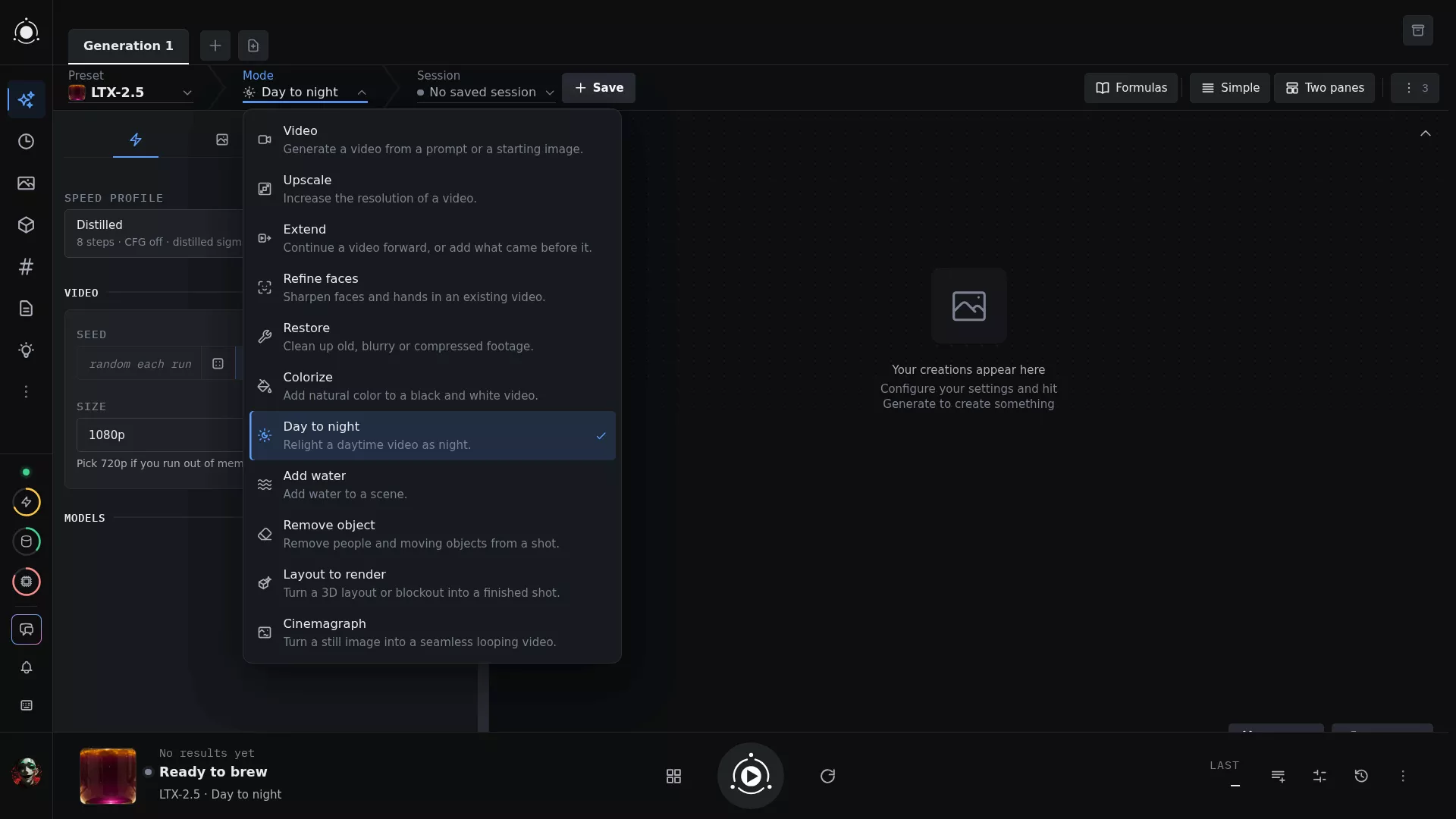 The LTX-2.5 mode picker
Motion transfer, Follow motion and Transparent video each need one model file besides the preset's own; Transition works without one. The mode names the file, and until the mode's files are installed it shows Install to admins and “not set up” to everyone else.
Motion transfer#
Motion transfer takes a picture of a person and a video of someone moving, and the person from the picture performs the moves. The look, clothes and background come from the picture; only the movement comes from the video.
-
Pick the mode
Choose LTX-2.5, LTX-2 / 2.3 or MiniMax-H3, then Motion transfer.
-
Add the picture and the video
On the References tab, Picture is who moves, and where. Video holds the moves to copy.
TipOne person, front-facing and well lit, works best in both. Crowds, motion blur and side profiles are where reading the pose fails.
-
Describe the shot, if you like
The prompt, labelled Look and action, is optional. Describe the person and the place, never the pose or the moves: the video supplies those.
-
Generate
What you will seeA video of the person from the picture doing the moves, opening on the picture itself. Turn on Save pose guide (Advanced) to also save the skeleton video that drove it, which is the quickest way to check the pose was read correctly.
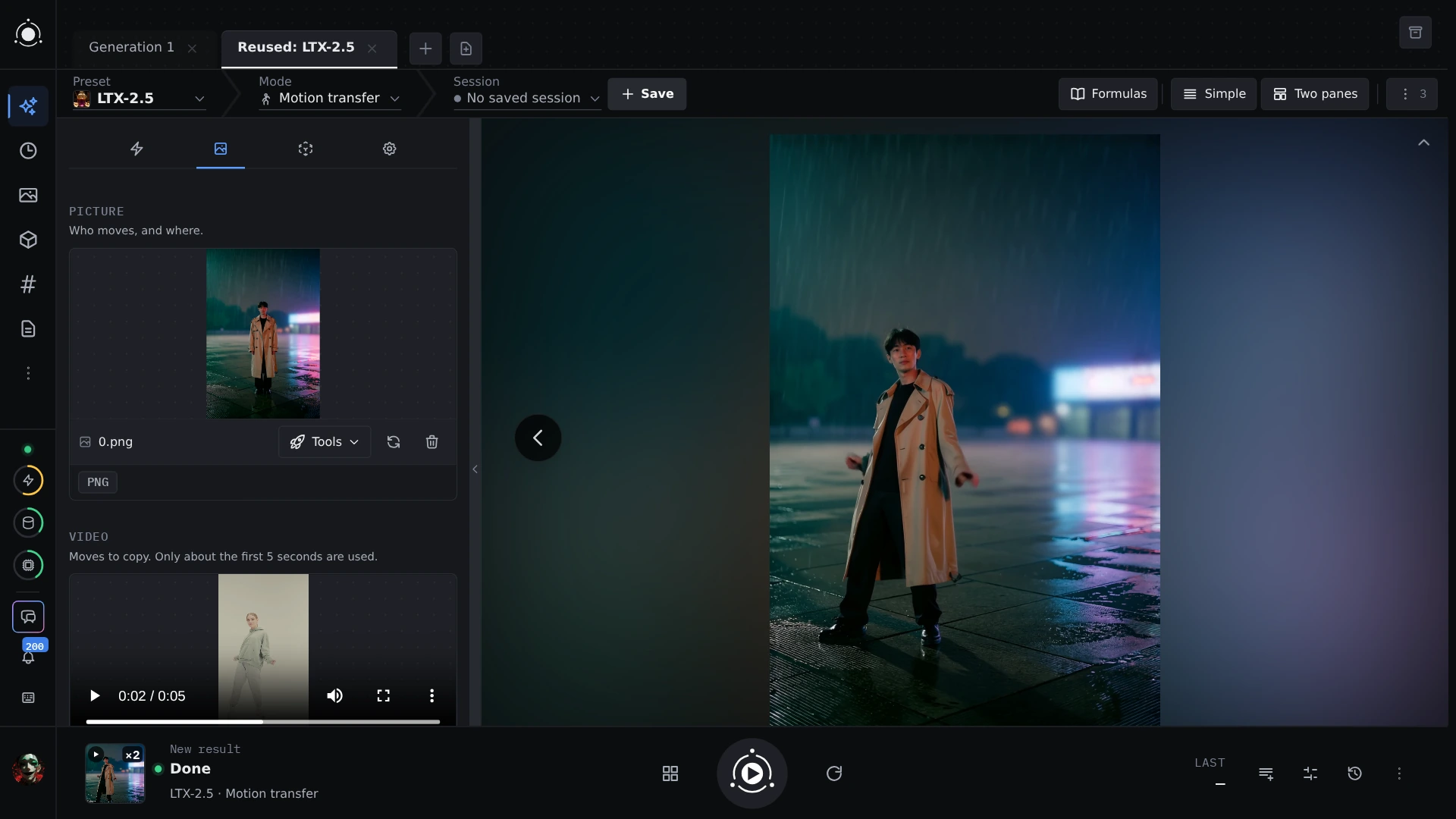 Motion transfer: the inputs and the result
How it works
PotionUI tracks a pose guide from the video: a skeleton of the body, hands and face on every frame. The skeleton is then retargeted onto the person in the picture, so a tall dancer and a short subject end up with the subject's own proportions. Ease in blends the first moments from the picture's own pose into the moves, so the first frame matches the picture. The model then follows that guide: through the Union-Control LoRA on LTX, or through a Fun ControlNet Union patch on MiniMax-H3.
The pose is read by the DWPose estimator (Apache-2.0). Its two files, yolox_l.onnx and dw-ll_ucoco_384.onnx, download on first use. Only one person is tracked: the largest one at the start.
Settings and limits
| LTX-2.5 and LTX-2 / 2.3 | MiniMax-H3 | |
|---|---|---|
| Extra model | Union-Control LoRA (“Download the Union-Control LoRA in this mode.”) | Control model, a Fun ControlNet Union 2.0 patch (“Download the Fun ControlNet patch in this mode.”). The int8 ConvRot file is the pick for 32 GB cards, bf16 the alternative. |
| Length used | About the first 5 seconds of the video | Up to 15 seconds; the result is as long as the video, up to 15 seconds |
| Follow strength | 0.5 to 1.5, default 1.0 (References) | 0.5 to 1.5, default 1.0 (Advanced) |
| Ease in | 0 to 2 s, default 0.5 | 0 to 2 s, default 0.5 |
| Sound | The video's own soundtrack is kept | Sound: Generate (new sound that fits the scene) or Keep the video's sound |
| Speed profile | Distilled by default. Balanced and Quality need the dev checkpoint. | Quality by default (24 steps). Turbo has not been checked with the pose guide, and Flex is not offered. |
The Union-Control LoRA was trained on LTX-2.3. The LTX-2.5 preset uses it unchanged; structural LoRAs like it need the distilled checkpoint, which is why the mode defaults to the Distilled speed profile. The MiniMax-H3 patch was trained on text-to-video only, so using it with a first frame picture is supported but not validated by its authors.
Follow motion
Follow motion is the scene version of Motion transfer, on both LTX presets. Instead of a person's pose, it copies a video's camera moves and layout onto a new scene.
- Video: the camera and layout to copy. Only about the first 5 seconds are used.
- First Frame: how the new scene starts.
- Follow: depth (the default) keeps camera and layout loosely; edges keeps outlines closely.
- New scene, the optional prompt: place, light, materials and mood. Never describe the camera moves or where things sit.
It uses the same Union-Control LoRA and Follow strength as Motion transfer. The video's soundtrack is not carried over, since the scene is new. Save guide (Advanced) saves the depth or edge video it followed. The depth model downloads the first time you follow depth.
Transition#
Transition, on LTX-2.5, takes a first and a last picture and makes the video between them.
-
Add the two pictures
On the References tab, First picture is where the video starts and Last picture where it ends.
-
Set the length
Length (seconds) runs from
1to10, default5. Resolution defaults to768x512. -
Say what happens between, if you like
The prompt, labelled What happens between, is optional. Describe how the first becomes the second, such as the camera move and the change itself, never the pictures. Left empty, it asks for a smooth cinematic transition from the first picture to the last.
-
Generate
The optional Transition LoRA (Apache-2.0) gives smoother, more dramatic changes, with a strength from 0.5 to 1.5. The mode adds its trigger word for you. It was trained on LTX-2.3 and its card does not say whether it loads on 2.5, so it stays optional: the mode works without it.
Transparent video#
Transparent video, on LTX-2.5, takes a clip and returns the same clip with the background cut out and the transparency kept.
-
Add the clip
Input Video on the References tab is the clip to cut out, up to about 40 seconds. There is no prompt.
-
Pick a size
Size is
1080pby default. Pick720pif you run out of memory. -
Generate
What you will seeA WebM with a real alpha channel, plus, by default, an MP4 of the cut-out over a checkerboard for players that cannot show transparency. Turn on Also save the black and white matte to get the matte itself: white is the subject, black the background, grey partly transparent. Library thumbnails show the subject on black.
- Needs the Alpha-Gen LoRA (beta, under the LTX-2 community licence, gated: accept the license on Hugging Face and set a token in Admin, Plugins).
- Matte cleanup on the Advanced tab: Clear below (
0to0.5, default0) removes a faint haze around the subject, Solid above (0.5to1, default1) makes a slightly see-through subject solid, and WebM quality (10to40, default24; lower is sharper and larger). - Playback. The WebM plays with transparency in Chromium and Firefox on Linux and Windows. Safari cannot show it; use the checkerboard MP4 there.
- ffmpeg. The WebM needs an ffmpeg with
libvpx-vp9. The ffmpeg bundled with PotionUI has it; a system ffmpeg without it makes the run fail with a message naming the missing encoder. - A PNG sequence export is not offered.
Long clips run in overlapping windows, like the other modes that take a clip. The Distilled or Custom speed profile is used, as the LoRA needs the distilled checkpoint.
Model licences#
MiniMax-H3's weights are published under the MiniMax H3 Community License, not an open-source license. Its Applicable Territory excludes the European Union, the United Kingdom, the United States and the Republic of Korea, and the exclusion extends to the model's outputs; use in those territories requires an individual authorization from MiniMax (https://platform.minimax.io/h3-license). The license additionally requires separate written authorization above US$20M annual revenue, and requires a commercial product's interface to display “MiniMax H3” prominently. PotionUI ships no H3 weights. The architecture implementation is ported from the Apache-2.0 diffusers source, which carries none of these terms.
The LTX-2.5 files are in gated Hugging Face repositories: accept the LTX-2 license on Hugging Face and set a token in Admin, Plugins before they can download.