
Author a preset
A preset is a folder of YAML files that gives one model a form and a pipeline. This guide takes you from an empty folder to a Z-Image preset that generates, with the same scaffold, lint and render tools the shipped presets are checked with.
On this page
What you will build#
A small but complete text-to-image preset for Z-Image: a preset.yml, one mode called txt2img, a form with three tabs (Generation, LoRA, Advanced) and the eight-step pipeline every shipped native image preset uses. It follows the preset tutorial, built the way the shipped Z-Image preset is, only smaller.
You need a PotionUI source checkout with its Python environment, because the scripts below run from the repository root. To generate at the end you also need the three Z-Image files (diffusion model, text encoder and VAE) in your models folders, and an administrator account. Nothing before the last step needs a GPU or a running server.
| File | What it holds |
|---|---|
preset.yml | The manifest: id, name, category, engine and the list of modes. The only required file. |
modes/<mode>/pipeline.yml | The ordered list of pipes (processing steps) that runs when someone presses Generate in that mode. |
modes/<mode>/form.yml | The form the mode shows, usually a set of tabs. |
modes/<mode>/tabs/*.yml | The fields of each tab. |
description.md | Optional long description in Markdown. |
public/ | Optional cover and example images. The only folder of a preset served over HTTP. |
files/form/*.yml | Optional option lists the form reads, such as a list of resolutions. |
Where presets live#
PotionUI scans two roots the same way:
content/presets/local/<Model>/<variant>/for presets that are yours. This folder is ignored by git, so start here.content/presets/marketplace/<Model>/<variant>/for the presets PotionUI ships.
A plugin can ship presets too, from a folder named in its manifest; see Build a plugin. Nothing reads meaning from the folder names: the engine comes from the engine: key in preset.yml, and a preset keeps its id wherever its folder sits, so moving it from local to marketplace does not make it a different preset. Fragments shared by many presets (resolution lists, common tabs) live once under content/presets/_shared/.
From an empty folder to a first picture#
-
Scaffold the folder
From the repository root, create the preset under your local root.
--family z_imagelooks up the real Z-Image loader and generator pipes and writes the standard chain wired to them, plus a form already using the right model types and the generator's own defaults.SHscaffoldpython scripts/preset_new.py MyZImage/standard --family z_image --root content/presets/local
What you will seeA line reading
Scaffolded preset '<id>' at content/presets/local/MyZImage/standard, the six files it created (preset.yml, and undermodes/txt2img/the pipeline, the form and three tab files), then the next steps: lint and render.Without
--familyyou get a bare skeleton with a singlegallerypipe, which is what you start from for a model family that has no pipes yet. Other options:--modes(comma-separated mode names, defaulttxt2img),--category(image,video,audio,3dorutility),--engine(defaultnative),--nameand--forceto overwrite. -
Read the manifest
The scaffold mints a fresh id and fills in the required keys:
YAMLpreset.ymlschema: 1 id: "<a new ULID>" name: "MyZImage standard" category: "image" version: "1.0.0" engine: "native" tags: [] vars: default_steps: 30 formulas: groups: {} modes: - txt2imgChange
nameto what users should see in the preset picker. Never changeidafter people have used the preset: History and assignments refer to it. Unknown top-level keys are rejected. Every key, includingmedia,speed_profilesandllm, is listed in the preset.yml reference. -
Read the pipeline
modes/txt2img/pipeline.ymllists the pipes in order. Each entry names a pipe, wires inputs from earlier pipes and passes configuration, usually read from the form:YAMLmodes/txt2img/pipeline.ymlpipeline: - name: "model_loader/z_image" enabled: true configuration: diffusion_model: { file_path: "{{ form.diffusion_model }}", name: "{{ form.diffusion_model }}" } text_encoder: { file_path: "{{ form.text_encoder }}", name: "{{ form.text_encoder }}" } vae: { file_path: "{{ form.vae }}", name: "{{ form.vae }}" } loras: "@loop": items: "{{ form.loras }}" template: file_path: "{{ item.model }}" weight: "{{ item.strength }}" - name: "prompt_encoder" input: - ["text_encoder", "model_loader/z_image", "text_encoder"] enabled: true configuration: p_prompt: input: "{{ generation.prompts.first.positive }}" output: "{{ generation.prompts.first.positive }}" n_prompt: input: "{{ generation.prompts.first.negative }}" output: "{{ generation.prompts.first.negative }}" pairs: "{{ generation.prompts.pairs }}" quantity: "{{ form.quantity }}" guidance_scale: "{{ form.guidance }}" - name: "seed_generator" enabled: true configuration: seed: "{{ form.seed }}" quantity: "{{ form.quantity }}" - name: "dynamic_prompts_renderer" id: "dynamic_prompts_renderer" enabled: true configuration: pairs: "{{ generation.prompts.pairs }}" quantity: "{{ form.quantity }}" - name: "from_iotype" id: "from_iotype" enabled: true input: - ["seed", "seed_generator", "seed"] configuration: from: "seed" - name: "param_emitter" id: "param_emitter" enabled: true input: - ["seed", "from_iotype", "seed"] configuration: quantity: "{{ form.quantity }}" parameters: - ["model", "{{ form.diffusion_model }}"] - ["model", "{{ form.text_encoder }}"] - ["model", "{{ form.vae }}"] - ["positive_prompt", "{{ generation.prompts.positives }}"] - ["negative_prompt", "{{ generation.prompts.negatives }}"] - ["guidance", "{{ form.guidance }}"] - ["steps", "{{ form.steps }}"] - ["sampler", "{{ form.sampler }}"] - ["resolution", "{{ form.resolution }}"] - name: "generator/z_image" input: - ["model", "model_loader/z_image", "model"] - ["conditioning", "prompt_encoder", "conditioning"] - ["seed", "seed_generator", "seed"] enabled: true configuration: steps: "{{ form.steps }}" guidance: "{{ form.guidance }}" sampler: "{{ form.sampler }}" resolution: "{{ form.resolution }}" quantity: "{{ form.quantity }}" - name: "gallery" input: - ["image", "generator/z_image", "image"] - ["seed", "seed_generator", "seed"] enabled: trueWhat each step does:
model_loader/z_imageloads the three model files the form picks, plus any LoRAs, and outputsmodelandtext_encoder.prompt_encoderturns the prompt intoconditioning. It needs the loader'stext_encoder, which is the one wiring the chain does not make obvious.seed_generatordraws the seeds from the form's seed and quantity.dynamic_prompts_renderer,from_iotypeandparam_emitterrecord the expanded prompts, the seed and the settings, so History can show exactly what made each picture. Copy them as they are.generator/z_imagesamples the picture, andgallerysaves it.
An
input:line reads[input name, source pipe, source output]. The source pipe is found by itsidwhen it has one, otherwise by itsname. Values in{{ }}are templates:form.*is the submitted form,generation.prompts.*the expanded prompts. The Pipes reference lists every pipe's inputs, outputs and configuration keys, and Preset context lists everything a template can read.NoteThe generator's key is
guidance, notcfg. The scaffold names the form field after the pipe's own key; a form field and a pipe key may have different names, but the pipeline must then map one to the other. -
Shape the form
modes/txt2img/form.ymlis the mode's form: a tabs container whose tab bodies come from separate files.YAMLmodes/txt2img/form.ymlname: "custom" short_description: "Generate an image from a text prompt." fields: - type: "tabs" children: - type: "tab" label: "Generation" children: "{{ paths.preset }}/modes/txt2img/tabs/generation.yml" - type: "tab" label: "LoRA" children: "{{ paths.preset }}/modes/txt2img/tabs/lora.yml" - type: "tab" label: "Advanced" audience: "advanced" children: "{{ paths.preset }}/modes/txt2img/tabs/advanced.yml"short_descriptionis the line the Mode menu shows under the mode's name; keep it to one plain sentence.audience: "advanced"hides the whole tab until the user switches the form to advanced. The Generation tab holds the seed and quantity row, the resolution and the three model pickers:YAMLmodes/txt2img/tabs/generation.yml (excerpt)fields: - type: "row" children: - name: "seed" type: "seed" label: "Seed" default: -1 width: "3/5" - name: "quantity" type: "stepper" label: "Quantity" default: 1 configuration: {min: 1, max: 10, step: 1} width: "2/5" - name: "resolution" type: "resolution" label: "Resolution" configuration: files: - { path: "{{ paths._shared }}/resolutions/sdxl.yml", group: "Standard" } default: "1024x1024" - name: "vae" type: "model" label: "Vae" required: true configuration: model_type: "vae" placeholder: "Select a z_image vae..."The scaffold writes labels and placeholders from the slot names, so tidy them now, for example
label: "VAE"andplaceholder: "Select the Z-Image VAE...". Every fieldnamemust match theform.<name>the pipeline reads. Amodelfield'smodel_typedecides which folder its picker lists; a wrong value lists the wrong files. -
Lint it
SHlintpython scripts/preset_lint.py content/presets/local/MyZImage/standard
What you will seeErrors and warnings by file. The command exits with
0when there are no errors; warnings do not fail it. No errors means the manifest is valid, every mode has its folder and everyform.<name>in the pipeline resolves against the form. -
Render it
Rendering runs the real template code with sample form data built from your defaults, and prints every pipe's configuration with its type. No server, model or GPU is involved.
SHrenderpython scripts/preset_render.py content/presets/local/MyZImage/standard txt2img
Check that
stepscame out as a number andlorasas a list. Pass--form values.ymlto render with your own form values instead of the defaults. -
Load it in the app and generate
The server reads the preset folders when it starts, so restart the backend after adding a new preset folder. Then open Administration, Presets, find the preset in the catalog and choose Install preset. Give people access on its Access tab: only installed presets can be made available to users and groups.
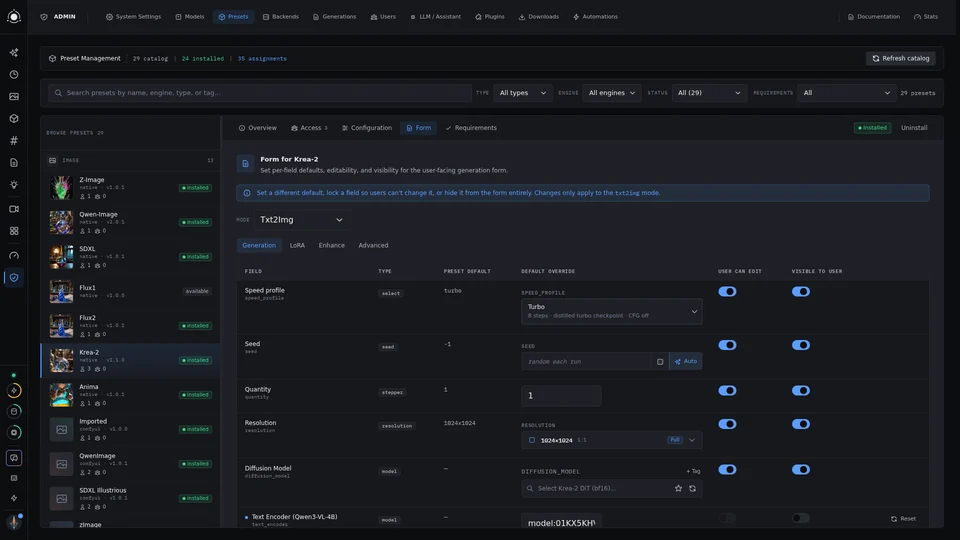 A preset in Administration, Presets
An installed preset with its Overview, Access, Configuration, Form and Requirements tabs. What you will seeThe preset appears in the Preset menu on the Generate page for the people you gave access, with the mode Text to Image. Pick the three model files, write a prompt and press Generate.
Forms, tabs and fields#
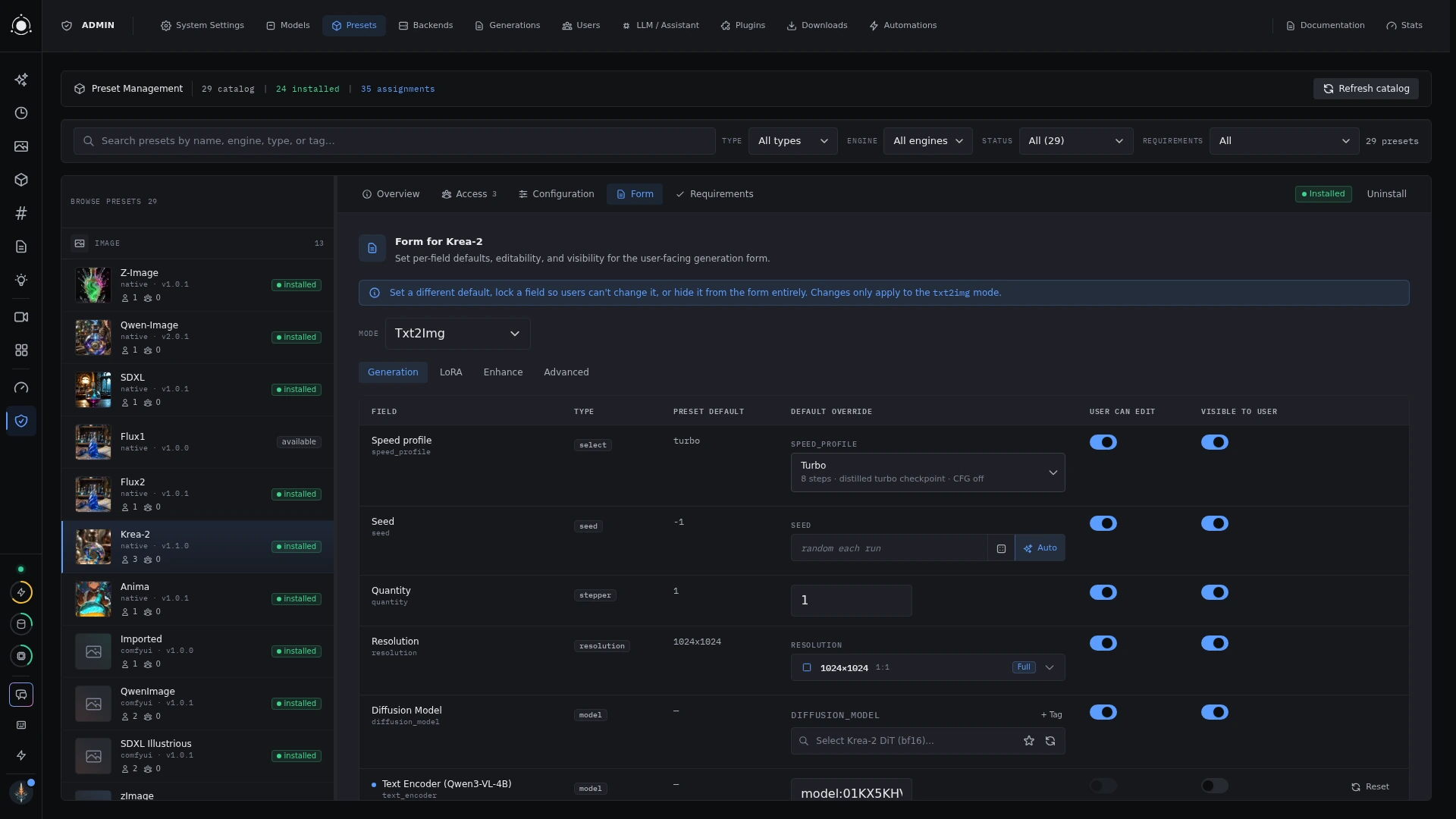
A mode's form.yml is its default form. A tab file holds its fields under a fields: key. Paths in children: may use {{ paths.preset }} (this preset's folder) or {{ paths._shared }} (the shared tree). Two modes that need the same tab keep one copy and point to it; do not copy files between presets or modes.
- Field types. Text (
string,textbox), numbers (number,integer,slider,stepper,seed,resolution), choices (select,segmented,checkbox_group,tags), models (model,lora_picker,sampler,schedule), media (image,video,audio,media,file) and layout (tabs,tab,row,group,accordion,section). Plugins can add more. The full, current list is in Preset context. - Defaults are typed.
default: 30on a slider, not"30";default: trueon a checkbox, not"true". A default may not contain a template. Lint reports a wrong type as an error. - Reactions. A form cannot read form data with templates. To show, hide or change a field based on another, use
reactions:withwhen:conditions. - Variants. A mode can offer more than one form under
modes/<mode>/variants/<name>/form.yml; the form'sname:is what a request selects. - Shared fragments with parameters. A fragment included as
children: {file: ..., vars: {...}}takes values marked{{ vars.<name> }}inside it.
Pipelines and templating#
- Exact expressions keep their type. A value that is exactly one
{{ expression }}, such as"{{ form.steps }}", becomes the real value: a number, a list or a boolean. Anything with surrounding text, like"steps: {{ form.steps }}", becomes a string. Feed pipes exact expressions. - Missing values are errors. Templates run strictly: a reference to a field the form does not have stops the build with an error naming the preset, mode and pipe. The only way to accept a missing value is a default, for example
"{{ form.steps | default(30) }}". - Switching a pipe on and off.
enabled:istrue,falseor one exact expression that gives a boolean. Leaving it out means enabled. A disabled pipe's configuration is never rendered, so it may reference fields that only exist when the feature is on. - Repeated slots.
"@loop"withitems:andtemplate:expands one template per item, as the LoRA list above does. Theactive_lorasfilter drops LoRAs set to zero strength. - What templates can read. In
pipeline.yml:form,request(the mode and form variant),generation(prompts and the resolved speed profile),preset(its id, name andvars),runtimeandpaths.preset. Form files can use onlypaths.presetandpaths._shared. Details in Preset context.
Families other than Z-Image use the same chain with their own loader and generator, for example model_loader/flux with generator/flux, or checkpoint_loader/sdxl with generator/sdxl. Pass the family to --family and the scaffold finds the pair for you. To add a step of your own to a pipeline, see Write a pipe.
Modes#
A mode is one thing the preset does: text to image, edit, image to video. To add one, list it under modes: in preset.yml and create modes/<mode>/ with its own pipeline.yml and form.yml. A listed mode without a folder is a lint error; a folder that is not listed is a warning.
- Name and icon. Users never see the raw key. Well-known keys get a standard name (
txt2imgis Text to Image,img2videois Image to Video). Setmode_label:andmode_icon:in the mode'sform.ymlonly when the standard name would be wrong for your preset. - No prompt. A mode that needs no prompt, such as an upscaler, is listed in
vars.promptless_modes. - Elixirs. Each mode can be used as a step of an elixir. Its inputs and outputs are worked out from its image and video fields and its
gallerypipes;modes/<mode>/elixir.ymloverrides that, and lint reports why a mode is not offered.
Model requirements#
A preset never downloads models by itself. It says what it needs in three places, and each does something different:
| Where | What it does |
|---|---|
recommendations on a model field | Lists downloadable models the picker offers when it is empty, by direct link or through a provider plugin with a ref. Entries can carry size_bytes, sha256, precision and GPU rules, which the Install modes recipe uses to pick and check files. python scripts/recommendations_fill.py <preset> fills those keys for Hugging Face entries. |
requirements: in preset.yml | Checked live on this instance and shown on the preset's Requirements tab in Administration, Presets. Core types are binary, python_package, model (by tag, hash, file name, or in a mode's form by field), vram_min_gb and platform. A backend that fails a check is not chosen to run the preset. |
requires: in preset.yml | min_vram_gb, recommended_vram_gb and min_ram_gb, shown as a badge in the preset picker before anyone downloads anything. Pure guidance, never checked. |
Take requires: numbers from the measured table on Hardware requirements. Where a family is not measured, leave the key out: a wrong minimum either turns away a card that would work or promises one that will not.
Test it#
python scripts/preset_lint.pywith no path lints every preset in both roots.--renderalso renders each mode's default form and reports template errors that only show when a template runs.- A
tests.ymlnext topreset.ymldescribes real generations with checks on the result (at least one output, the expected resolution, not black).python scripts/preset_test_suite.pyruns them against a running instance and writes an HTML gallery; see its--help. - Administrators can run the same lint over HTTP with
GET /api/developer/presets/lint.
Common mistakes#
| What happens | Why | Fix |
|---|---|---|
| Generation fails with an undefined value error naming a pipe | The pipeline reads form.x but the form has no field x and no default. | Add the field, give it a default:, or write | default(...) in the template. Reproduce with preset_render.py. |
| A pipe ignores a setting | A guessed configuration key, such as cfg where the pipe expects guidance. Unknown keys are passed through without an error. | Copy keys from the Pipes reference. |
| The build stops: a pipe is not found | A made-up pipe name, or a family pipe written by hand. | Scaffold with --family, or copy the name from the Pipes reference. |
| The generator has no conditioning | prompt_encoder is missing or not wired to the loader's text_encoder. | Keep the standard chain as scaffolded. |
| A model picker lists the wrong files | Wrong model_type. | Use a value from the model_type table in Preset context. |
| A pipe never runs | enabled: is a string with text around the expression, so it never becomes true. | Use true, false or one exact {{ expression }}. |
| Load fails with an unknown key | A removed key such as an inline description: or supported_backends: in preset.yml. | Move prose to description.md; use the single engine: key. preset_lint.py --fix migrates old manifests. |
| The new preset is not in the catalog | The server has not read the folder yet. | Restart the backend, then Install preset in Administration, Presets. |